Friday, 16 October 2015

Fb Triks


Steps To Make Single Name Facebook Account

Part 1:- Proxy Settings For Browser


  • First of all to use single name on Facebook. We need to Add manual proxy settings in our browser. So we need to use Indonesian proxy Search it at Google or i recommend to find it from Proxynova.com or any other site of your choice. 
  •  If you have knowledge about Using proxy settings in browser then its good. If you are don't know how to add proxy then read How To Add Proxy Settings in Browser.
 OR
  • In case Your are not able to add proxy settings and facing any problem then i recommend to download Hola Better Internet VPN.
  • Install Hola Extension in Firefox or Chrome and then turn ON Hola and search and select Country Indonesia. 
  • It will automatically Implement proxy settings on your browser so you don't need to add proxies manually. 
hola-country-settings

Part 2:- Settings To Make Single Facebook Account


  • After doing proxy settings manually or by using Hola extension make sure it is working fine on Facebook.
  • Now its time to create single name id to do this.
  • Open your Facebook Account  Settings.
  • Change your language to Bahasa Indonesia.
facebook-language-settings 
      • Then  edit your current Facebook profile name and Simply remove Your Last Name. After that review your name and Save it. 
      facebook-single-name-settings
        • After that your Facebook Account is only using First Name and you will see that Last Name Hide.
        • After Completing all steps, Remove Manual Proxy or Turn off Hola and change your language back to English (US) or other according to you. 
        Note:- Make Sure that You Don't had already changed your account name from last 60 days and otherwise you will not be able to make single name until you crossed 60 days time period. If you crossed name change limit then it is not possible try it on another account.

        Fb Triks

        Steps To Add All Friends in Facebook Groups


        • First of all Log in into that whose friends you want to invite.
        •  Then open your Facebook Group in which you want to add friends.
        • Now Click F12 button to open debugger and then select console box.
        • Now copy script from below given button.
          • Copy paste the whole provided code and then paste them into console box.
          add-all-friends-to-facebook-group-script-code
            • Press enter and process will start for sending invitation.
                Note:- Don't worry about anything this script is totally safe. In case you have too many friends then you get blocked for using groups or even your account may get locked. So be careful.

                Fb Triks


                How To Bypass photo verification

                Photo verification on Facebook : Trick to bypass photo verification.
                No more photo Tag .Bypass photo verification and photo tag by this trick.
                Facebook is like a life for us and we can not loose our accounts so easily .
                if you are having issues with photo tag verification then its time to bypass
                it with Japanese proxy.When this trick gets blocked then do inform us so 
                we can update the trick accordingly because we can not check proxy every 
                time but HackingTryx want its visitors to have fully working tricks.
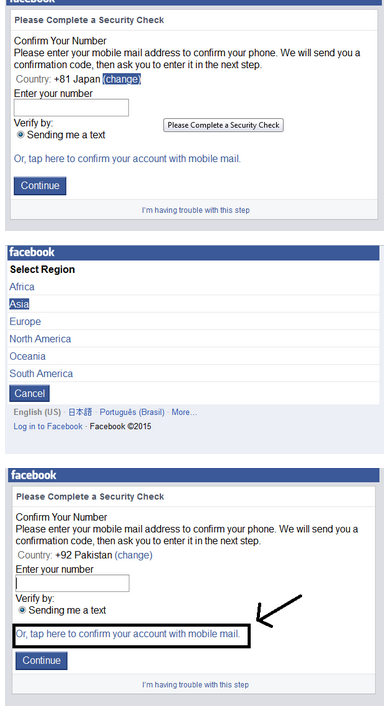
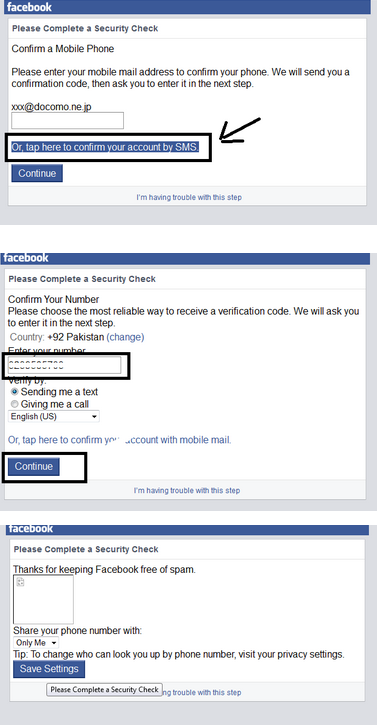
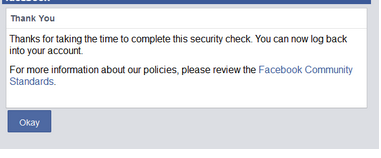
                Now follow the below simple steps to bypass photo verification with japanese proxy trick.
                Steps are made clear with pictures.If you find difficulty then ask for help.Do not miss
                any step otherwise you will be unable to bypass photo verification.


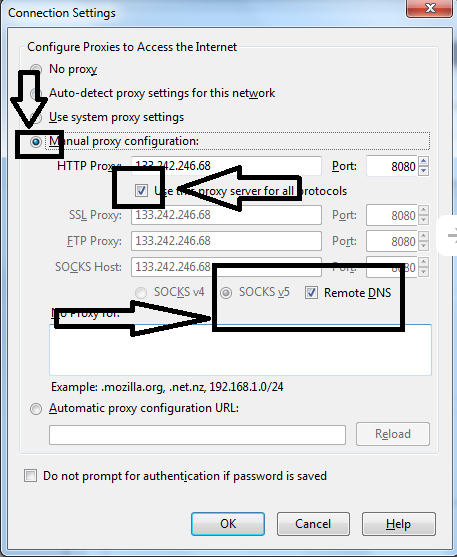
                Open Firefox and set proxy and port( UPDATED STEP )
                Fb Triks

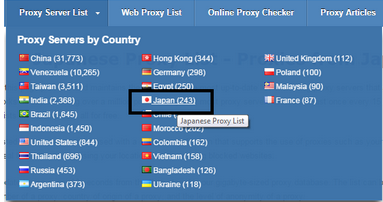
                Bypass photo tag proxy : 106.186.125.220 Port 3128 If above proxy and port don't
                work then go to Proxynova.com and get a new Japanese proxy

                Fb Triks
                Now Open m.facebook.com "only open m.facebook otherwise it will not work"


                Now Follow the below steps and enjoy
                Fb Triks
                Fb Triks
                  Do share if you care :)  Do not copy as it is.If you want to copy paste all data then place my link on your blog :)
                Do share if you care :) Do not copy as it is.If you want to copy paste all data then
                place my link on your blog :)